
Computer Vision - Part 3: CNNs for Computer Vision
Computer Vision — Part 3: CNNs for Computer Vision
Part 1 showed you how to build filters by hand. A Sobel filter for edges. A Gaussian filter for blur. A median filter for cleaning up noise. Every one of those filters used numbers that a person chose, in advance, by hand.
That works great for “make it blurry” or “find the edges.” It does not work at all for “find the cat.” Nobody on Earth can sit down and hand-write a filter for “cat-ness.” So instead of a person choosing the numbers, we let the computer figure out its own numbers, by looking at a huge pile of example photos. That’s the whole idea behind a CNN, short for Convolutional Neural Network.
This part is a short, simple primer. Just enough to understand the object detectors later in this series (Region-Based Detectors, Anchor Boxes, YOLO, and SSD all lean on the ideas here). If you want the full deep dive, with exact formulas and a real architecture explained layer by layer, see the Deep Learning section’s Part 9: Convolutional Neural Networks.
1. A filter you invent yourself, vs a filter a robot invents
Imagine you carve your own rubber stamp. It always stamps the exact same shape, forever. That’s a hand-designed filter, like the Sobel filter from Part 1. It’s great at its one job and terrible at everything else.
Now imagine instead you hand a robot ten thousand photos of cats, dogs, cars, and trees, and you ask it, “invent your own rubber stamp, whatever helps you tell these apart.” The robot tries random stamp shapes, checks how well each one helps, and keeps nudging the shape until it becomes genuinely useful, maybe it turns into an edge detector, maybe a “patch of orange fur” detector, maybe something a person would never have thought to design. Nobody told it what to look for. It found something useful on its own.

That’s really all a convolutional layer is: the exact same sliding, multiply-and-add operation from Part 1, except the little grid of numbers, the filter, is no longer chosen by a person. It’s a bunch of adjustable numbers that the network tweaks, bit by bit, every time it gets something wrong during training, until the filter becomes genuinely useful.
2. Many filters means many maps
A CNN never uses just one filter. It uses a whole bunch at once, often 32, 64, or more, all learning something different, side by side, on the very same photo.
Think of each filter as its own highlighter pen. One highlighter only lights up edges. Another only lights up orange, fur-like patches. Another only lights up rounded curves. Run all these highlighters over the same photo, and each one draws its own separate map of “here’s where I found my thing.” That map is called a feature map.

If a layer has 64 filters, you get 64 feature maps out, stacked together like 64 see-through sheets of tracing paper laid on top of each other. That whole stack moves on to the next layer as its input.
3. Stack the layers and watch understanding grow
One layer of filters can only notice simple things: an edge here, a colour there. The real magic happens when you stack many convolutional layers, one after another. Each new layer doesn’t look at raw pixels anymore, it looks at the previous layer’s feature maps, so it’s really looking at combinations of edges and colours.
Think of it like building with LEGO. First you have loose bricks (edges). Then you snap a few bricks into small pieces (a corner, a fuzzy patch). Then those pieces become recognisable parts (an eye, a paw). Finally the parts come together into the whole finished model (a cat!).

Here’s the genuinely useful part: the earliest layers (edges, colours) end up learning things that are useful for almost any photo, not just cats. Only the deeper layers get picky and specific. Keep that in mind, it matters a lot in a couple of sections.
4. Pooling: squint a little, on purpose
Between these stacked layers, a CNN usually shrinks its feature maps down a bit, on purpose. The most common way is called max pooling: look at each small 2×2 patch of the feature map, and keep only the biggest number, throwing the other three away.
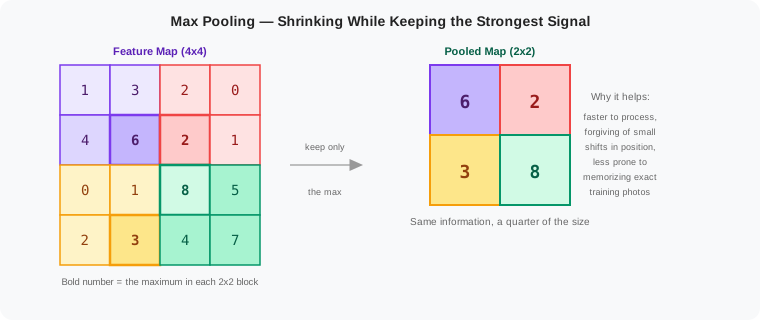
Why deliberately throw information away? Two reasons. First, smaller feature maps are cheaper and faster for the next layer to process. Second, and more surprising, it makes the network a little forgiving about exactly where something was. If a cat’s ear shifts two pixels to the left in a new photo, it still probably lands inside the same pooled square, so the network still notices it. It’s a bit like squinting at a busy photo, you lose some fine detail, but the big important shapes still stand out clearly.
5. Put it all together: a backbone
Stack enough (learn filters → make feature maps → pool) blocks in a row, and you get a machine that takes a raw photo in one end, and hands out a small, deep stack of feature maps at the other end, a compact summary of “here’s every pattern I noticed, and roughly where.”
That whole stack, by itself, with no final decision bolted on yet, is often called a backbone. On its own, a backbone doesn’t say “cat” or “dog.” It just hands over its notes. Something else has to actually read those notes and make a decision.
Here’s the really important trick this entire series depends on: nobody trains a fresh backbone from scratch every single time. Instead, people train one backbone once, on a giant, general pile of over a million photos (a famous one is called ImageNet, with a thousand different categories), until it gets genuinely excellent at noticing edges, textures, fur, wheels, and every other everyday visual pattern. Then that same, already-trained backbone gets reused, again and again, for completely different jobs.

This is exactly like a photographer who takes one detailed photo, then hands prints to three different people: one just wants to know “what’s the main subject,” one wants to circle every object in it, one wants to cut out the exact outline of each object with scissors. All three people work from the very same photo. Only the small part on top, what to actually do with the backbone’s notes, changes per job.
This is why, in the rest of this series, you’ll keep running into a phrase like “a CNN pretrained on ImageNet.” It means exactly this: somebody else’s already-trained backbone, reused as the very first stage of a detector, so the detector doesn’t have to relearn what an edge or a fur patch looks like from zero.
6. Where do these backbones actually come from?
“A CNN pretrained on ImageNet” is not one single thing — it’s a lineage of named architectures, each one solving a specific limitation of the one before it. You don’t need to memorise their internals, but you will keep seeing these names (ResNet especially, as the backbone inside Faster R-CNN, SSD, and many YOLO versions), so it helps to know roughly what each one contributed.
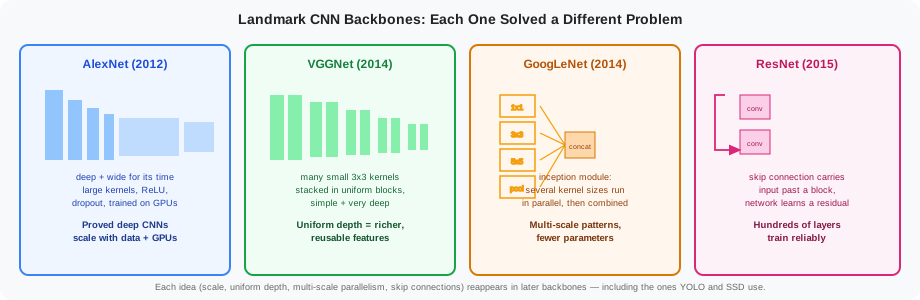
- AlexNet (2012) was the model that kicked off the deep learning era in vision. It showed that a genuinely deep CNN, trained on a large dataset (ImageNet) using GPUs, could beat every hand-crafted feature method that came before it. It used large convolutional kernels together with ReLU activations and dropout to train reliably.
- VGGNet (2014) simplified the design: instead of varying kernel sizes, it stacked many small
3 × 3kernels in uniform blocks, over and over, and just made the network deeper. This uniform, repetitive structure turned out to learn very rich, very reusable features, which is exactly why VGG16 is still used today as a simple teaching example and a solid general-purpose backbone (see Part 9’s full VGG16 walkthrough in the Deep Learning section). - GoogLeNet (2014) took a different approach: its inception module runs several kernel sizes (
1×1,3×3,5×5) and a pooling branch in parallel on the same input, then concatenates all their outputs together. This lets one layer notice patterns at several different scales at once, while actually using fewer parameters than a single large-kernel layer would. - ResNet (2015) solved a problem that showed up once networks got very deep: adding more layers was making accuracy worse, not better, because gradients had trouble flowing all the way back through so many layers during training. ResNet’s fix was the skip connection — a shortcut that carries a block’s input forward and adds it to the block’s output, so the block only has to learn the residual (the difference), not the whole transformation from scratch. This made it possible to train networks with hundreds of layers reliably, and the skip-connection idea has since spread far beyond computer vision.
Each of these ideas — scaling up, uniform depth, multi-scale parallel branches, and skip connections — keeps reappearing in the backbones used by the detectors later in this series.
7. Summary
- A convolutional layer is Part 1’s sliding filter, except now the filter’s numbers are learned from photos, not chosen by hand.
- Many filters run at once, each one producing its own feature map, all stacked together.
- Stacking layers builds understanding step by step: edges → textures → parts → whole objects.
- Pooling shrinks the feature maps between layers, for speed, and for a little tolerance to things shifting slightly.
- A stack of convolution and pooling layers, with no final decision on top, is called a backbone, a reusable notebook of visual patterns.
- Detectors almost always start from a backbone pretrained on a huge, general dataset like ImageNet, rather than starting from nothing.
- Landmark backbones each solved a specific problem: AlexNet proved deep CNNs scale with data and GPUs, VGGNet showed uniform stacked-depth learns rich features, GoogLeNet captured multiple scales at once with parallel inception modules, and ResNet used skip connections to train networks hundreds of layers deep.
For the full mathematical depth behind everything above, exact output-size and parameter-count formulas, how learning actually flows backward through a filter, and a complete layer-by-layer walkthrough of a real architecture (VGG16), see Part 9: Convolutional Neural Networks in the Deep Learning section.