
Computer Vision - Part 9: YOLO Evolution and YOLO11 Demo
Computer Vision — Part 9: YOLO Evolution and YOLO11 Demo
YOLO is one of the most influential object-detection families because of its speed. This part traces how YOLO evolved from a simple grid idea to modern versions, and then shows a hands-on demonstration with YOLO11, the latest YOLO release from Ultralytics.
1. Why track the evolution of YOLO?
Each YOLO version fixed real problems that the previous one exposed:
- detecting small objects
- handling many scales
- training faster
- reducing model size
- making deployment easier
Seeing the progression also helps you choose the right version for a real project and understand the design choices behind modern detectors.
2. The YOLO family
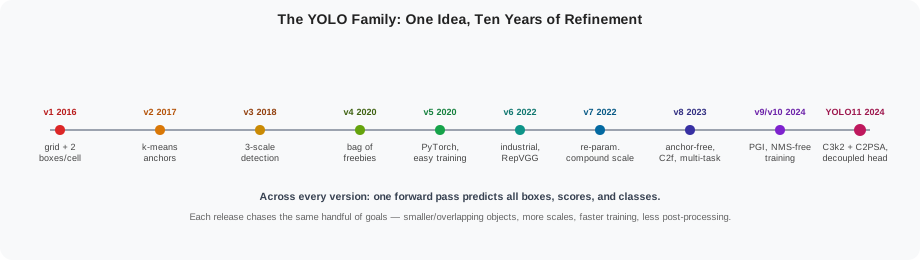
| Version | Year | Key ideas |
|---|---|---|
| YOLOv1 | 2016 | First single-network detector. Image divided into an S × S grid; each cell predicts B boxes and C classes. Fast but poor at small objects. |
| YOLOv2 / YOLO9000 | 2017 | Added batch normalisation, higher-resolution classifier, anchor boxes generated by k-means clustering, multi-scale training. Could detect 9,000 classes. |
| YOLOv3 | 2018 | Used three detection scales, a deeper Darknet-53 backbone, and independent logistic classifiers. Much better for small objects. |
| YOLOv4 | 2020 | A bag of freebies (data augmentation, Mosaic, DropBlock) and a bag of specials (SPP, PANet, SAM, CIoU loss). Achieved state-of-the-art speed/accuracy trade-off. |
| YOLOv5 | 2020 | Ultralytics implementation in PyTorch, very easy to train, many pretrained sizes from nano to extra large. |
| YOLOv6 | 2022 | Industrial focus from Meituan: efficient RepVGG-style backbone, hardware-aware design. |
| YOLOv7 | 2022 | Introduced trainable bag-of-freebies, model re-parameterisation, and compound scaling. |
| YOLOv8 | 2023 | Anchor-free design, task-aligned head, C2f blocks, strong support for classification, segmentation, and pose. |
| YOLOv9 / YOLOv10 | 2024 | Programmable gradient information (PGI) / NMS-free training and one-to-one label assignment for faster inference. |
| YOLO11 | 2024 | Latest Ultralytics release: improved backbone and neck using C3k2 blocks, better efficiency, and updated training recipes. |
The details change, but the core idea stays the same: one forward pass predicts all boxes, scores, and classes.
3. Big improvements across versions
| Problem | Fix introduced |
|---|---|
| Tiny objects missed | Multi-scale detection heads (YOLOv3) |
| Anchor mismatch | K-means anchor clustering (YOLOv2) |
| Training instability | Batch normalisation, better loss functions (YOLOv2-4) |
| Slow inference | Simpler backbones, model re-parameterisation (YOLOv5-7) |
| Complex post-processing | Anchor-free and end-to-end designs (YOLOv8-10) |
| One architecture for many tasks | Multi-task head supporting detection, segmentation, pose (YOLOv8+) |
4. What is YOLO11?
YOLO11 is the current stable Ultralytics YOLO model, developed by Glenn Jocher’s team. It is not a new research paper with a radically different idea; it is the next iteration of the YOLOv8-style architecture, focused on efficiency, architectural refinement, and multi-task versatility.
The architecture is task-agnostic: the same backbone/neck/head skeleton, with small head changes, powers detection, instance segmentation, pose estimation, classification, and oriented bounding boxes.
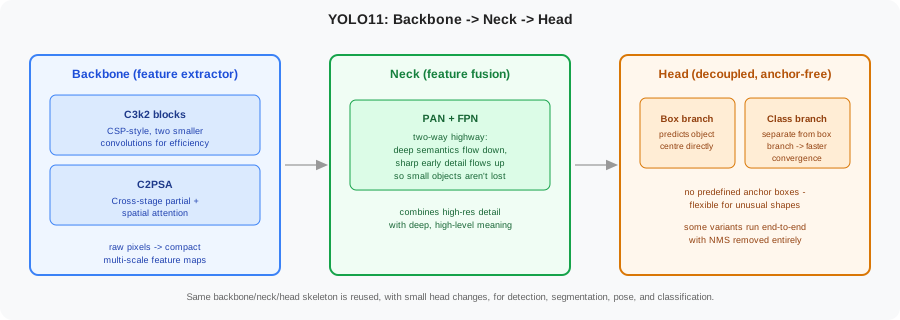
Backbone: the feature extractor
The backbone looks at raw pixels and shrinks the image down into a small set of important features. YOLO11 introduces two structural changes here:
- C3k2 — a CSP (cross-stage partial) block built from two smaller convolutions instead of one large one, which is cheaper to run on modern GPUs.
- C2PSA — a cross-stage partial block with spatial attention, which helps the network focus on the most relevant regions of the feature map.
Neck: feature fusion
The neck combines high-resolution detail from early layers with the semantic meaning built up in deep layers. YOLO11 uses an optimised PAN-FPN (Path Aggregation Network + Feature Pyramid Network): a two-way information highway where deep, high-level meaning flows down and sharp, low-level pixel detail flows back up. This shortcut of early detail into the final layers is what keeps small objects from being lost as data flows through the network.
Head: decoupled and anchor-free
Unlike having one head predict both class and box together, YOLO11 uses a decoupled head — a separate branch predicts the bounding box and a separate branch predicts the class. This leads to faster convergence during training.
The head is also anchor-free, inherited from YOLOv8: it predicts the centre of the object directly instead of fitting predefined anchor boxes, which makes it more flexible for objects of unusual shapes and sizes.
Key efficiency improvements
- Optimised convolutions — heavy standard convolutions are replaced with depth-wise and point-wise alternatives wherever possible, increasing frames per second.
- Improved spatial pyramid pooling — an updated pooling module helps the network understand objects at very different scales, improving accuracy.
- NMS-free option — some YOLO11 variants support fully end-to-end detection, removing the non-maximum-suppression post-processing step entirely and reducing latency (earlier versions always needed an NMS pass to remove duplicate, noisy boxes).
- Mixed-precision support — native FP8 and INT8 quantisation lets the model run extremely fast on both enterprise GPUs (e.g. H100) and edge devices.
The most important thing for a beginner is that YOLO11 keeps the same simple Python API as YOLOv8 while providing better accuracy and speed.
5. Practical demonstration: object detection with YOLO11
This example uses the official ultralytics Python package. You can run it in a notebook or a script.
Step 1: install the package
pip install ultralytics
Step 2: run inference on an image
from ultralytics import YOLO

# Load a pretrained nano model (smallest and fastest)
model = YOLO("yolo11n.pt")

# Run inference on an image
results = model("street.jpg")

# results is a list; for one image use results[0]
result = results[0]

# Print detected boxes
print(result.boxes)

# Show the image with boxes
result.show()

# Save the output
result.save(filename="street_out.jpg")
Step 3: interpret the output
The result object contains:
| Attribute | Meaning |
|---|---|
boxes.xyxy |
Bounding boxes in [x1, y1, x2, y2] format |
boxes.conf |
Confidence score for each box |
boxes.cls |
Class index for each box |
result.names |
Dictionary mapping class index to class name |
for box, conf, cls in zip(result.boxes.xyxy, result.boxes.conf, result.boxes.cls):
    label = result.names[int(cls.item())]
    x1, y1, x2, y2 = box.tolist()
    print(f"{label}: {conf.item():.2f} at ({x1:.0f}, {y1:.0f}, {x2:.0f}, {y2:.0f})")
Step 4: run on a video or webcam
# Process a video file and save the result
model("traffic.mp4", save=True)

# Use the webcam (device 0)
model.predict(source=0, show=True)
Step 5: train on your own data
If you have a dataset in YOLO format, training is one line:
# Start from pretrained weights
model = YOLO("yolo11n.pt")

# Train on your custom YAML dataset
model.train(data="my_data.yaml", epochs=50, imgsz=640, batch=16)
A YOLO dataset YAML file looks like this:
path: /path/to/dataset
train: images/train
val: images/val

names:
  0: cat
  1: dog
  2: bicycle
6. How to choose a YOLO11 model size
Ultralytics provides five standard sizes:
| Model | Suffix | Speed | Accuracy | Use case |
|---|---|---|---|---|
| YOLO11n | n |
Fastest | Moderate | Nano — Raspberry Pi, IoT and mobile edge devices |
| YOLO11s | s |
Fast | Good | Small GPUs, research and prototyping |
| YOLO11m | m |
Medium | Better | Balanced speed/accuracy on desktop GPUs |
| YOLO11l | l |
Slower | High | Server-side processing, plenty of VRAM |
| YOLO11x | x |
Slowest | Best | Enterprise/commercial serving on data-centre GPUs (e.g. NVIDIA A100) |
Start with yolo11n.pt for prototypes and switch to a larger model only when accuracy is not good enough. In practice, n/s cover edge and research use, m is the general-purpose sweet spot, and l/x are reserved for server-side deployments where GPU memory is not the bottleneck.
7. Common mistakes with YOLO
| Mistake | Fix |
|---|---|
| Forgetting to normalise labels | YOLO expects coordinates relative to image width and height. |
| Using a model too large for the device | Use n or s for CPU or edge inference. |
| Not enough training data | YOLO still needs hundreds to thousands of labelled examples. |
| Wrong image size | Keep the training imgsz consistent with the deployment size. |
| Ignoring class balance | Oversample rare classes or use data augmentation. |
8. Summary
- YOLO pioneered one-stage, real-time object detection.
- Each version improved speed, accuracy, or ease of use: multi-scale heads, anchor clustering, anchor-free designs, and better backbones.
- YOLO11 is the current Ultralytics release, keeping the simple API while adding architectural improvements and broader task support.
- With
ultralytics, inference, training, and deployment become a few lines of Python. - Choose model size based on hardware and accuracy needs: start with
yolo11n.pt.
This completes the Computer Vision object-detection series.