
Saturday Morning Coffee ☕ Thoughts on Agentic AI
Saturday Morning Coffee ☕ Thoughts on Agentic AI
The Complaint I Keep Hearing
Whenever I speak with friends mostly outside my organization they usually complain that there’s a huge push for generative AI, but not many visible success stories.
Everyone’s excited about demos. Few are confident about production.
And I think I know why.
The Real Problem
Agentic AI is not failing because it’s weak.
It’s failing because we’re asking it to do the wrong job.
I see many teams focusing on creating new workflows while moving away from deterministic pipelines. They’re trying to replace proven, boring infrastructure with intelligent agents.
That’s backwards.
The Right Approach
Here’s what I believe:
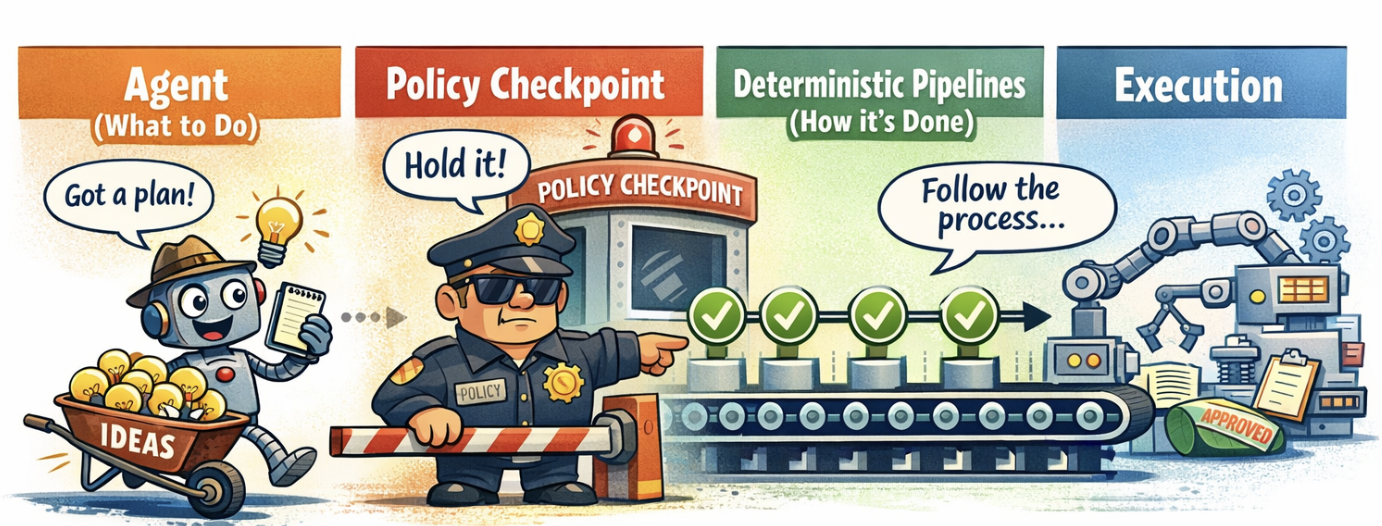
Agentic AI should decide WHAT to do.
Deterministic pipelines should decide HOW it’s done.
Let me break this down.
What Agents Are Good At
Agents are excellent at:
- ✅ Understanding intent
- ✅ Breaking ambiguity into plans
- ✅ Choosing the next best action
- ✅ Adapting to context
What Agents Are NOT Good At
They’re not built for:
- ❌ Repeatability
- ❌ Compliance
- ❌ Audit trails
- ❌ Guaranteed execution
What Pipelines Are Good At
Pipelines are the opposite:
- ✅ Repeatable
- ✅ Auditable
- ✅ Compliant
- ✅ Boring (and that’s exactly why they work in production)
The Winning Model
The winning model isn’t “agents replacing workflows.”
It’s agents orchestrating workflows.
Understands Intent
Decides WHAT to do"] Pipeline["⚙️ DETERMINISTIC PIPELINE
Executes HOW
(includes policies & validation)"] Human["👤 HUMAN
Reviews & Approves
Stays Accountable"] Agent -->|"Creates Execution Plan"| Pipeline Pipeline -->|"High-stakes decisions"| Human Human -->|"Approval"| Pipeline Pipeline -->|"Feedback & Learning"| Agent style Agent fill:#e1f5ff,stroke:#0066cc,stroke-width:3px style Pipeline fill:#fff4e6,stroke:#ff9800,stroke-width:3px style Human fill:#f3e5f5,stroke:#9c27b0,stroke-width:3px
Agents plan. Pipelines execute (with policies baked in). Humans stay accountable.
That’s how you move agentic AI from demos to infrastructure—without creating operational anxiety.
A Word About MCP (Model Context Protocol)
MCP is a great idea. It’s a powerful way to give agents access to external tools and data.
But you don’t need to put MCP everywhere.
I see teams adding MCP servers for everything:
- Database queries → MCP server
- API calls → MCP server
- File operations → MCP server
- Email sending → MCP server
Then they wonder why their system is complex and hard to debug.
When to Use MCP
✅ Use MCP when:
- Agents need dynamic discovery of tools
- You want standardized tool interfaces across multiple agents
- You’re building reusable tool libraries
- You need runtime tool registration
When NOT to Use MCP
❌ Don’t use MCP when:
- You have deterministic pipelines (just call them directly!)
- You need strict compliance (policies should be in your pipeline code)
- You want simple, auditable flows (MCP adds indirection)
- You’re building production-critical workflows (keep it simple)
The Right Mental Model
Dynamic Tools"] end subgraph "Pipeline Layer (Deterministic)" P1["Pipeline 1
Check Order"] P2["Pipeline 2
Process Refund"] P3["Pipeline 3
Send Email"] end A -->|"Discovers tools"| MCP A -->|"Calls directly"| P1 A -->|"Calls directly"| P2 A -->|"Calls directly"| P3 style A fill:#e1f5ff,stroke:#0066cc,stroke-width:2px style MCP fill:#e8f5e9,stroke:#4caf50,stroke-width:2px style P1 fill:#fff4e6,stroke:#ff9800,stroke-width:2px style P2 fill:#fff4e6,stroke:#ff9800,stroke-width:2px style P3 fill:#fff4e6,stroke:#ff9800,stroke-width:2px
Think beyond MCP:
- MCP is for tool discovery and flexibility
- Pipelines are for deterministic execution
- Use the right tool for the right job
You need to understand what that pipeline does. If it’s deterministic, repeatable, and needs audit trails it’s a pipeline. Call it directly. Don’t wrap it in MCP just because you can.
Real-World Example: Intelligent Email Assistant
Let me show you what this looks like in practice.
The Problem
You receive hundreds of emails daily:
- Customer support requests
- Sales inquiries
- Internal questions
- Spam and noise
You want AI to help, but you can’t just let an agent “do whatever it thinks is best” with your email.
The Wrong Approach ❌
Pure Agentic Solution:
Problems:
- ❌ What if the agent misunderstands?
- ❌ How do you audit what it did?
- ❌ Can you rollback a sent email?
- ❌ How do you ensure compliance?
The Right Approach ✅
Agent Orchestrates Pipelines (with policies baked in):
• Support request?
• Sales inquiry?
• Urgent?
• Sentiment?"] Plan["Create Execution Plan
Intent: Customer needs refund
→ Check order
→ Verify eligibility
→ Draft response"] end subgraph Pipeline["⚙️ DETERMINISTIC PIPELINE (with policies)"] P1["Step 1: Check Order
→ Query database
→ Return structured data"] P2["Step 2: Verify Eligibility
🛡️ Policy: Check refund window
🛡️ Policy: Check order status
→ Return yes/no + reason"] P3["Step 3: Draft Response
🛡️ Policy: Use approved template
🛡️ Policy: Check amount threshold
→ Return draft"] P4["Step 4: Policy Check
🛡️ Amount < $100 → Auto-approve
🛡️ Amount > $100 → Human review
🛡️ Premium tier → Expedite"] end Human["👤 Human Review
(if needed)"] Send["✅ Send with Audit Trail"] Email --> Intent Intent --> Plan Plan --> P1 P1 --> P2 P2 --> P3 P3 --> P4 P4 -->|"High stakes"| Human P4 -->|"Auto-approved"| Send Human -->|"Approved"| Send style Email fill:#fff,stroke:#333 style Intent fill:#e1f5ff,stroke:#0066cc,stroke-width:2px style Plan fill:#e1f5ff,stroke:#0066cc,stroke-width:2px style P1 fill:#fff4e6,stroke:#ff9800,stroke-width:2px style P2 fill:#fff4e6,stroke:#ff9800,stroke-width:2px style P3 fill:#fff4e6,stroke:#ff9800,stroke-width:2px style P4 fill:#fff4e6,stroke:#ff9800,stroke-width:2px style Human fill:#f3e5f5,stroke:#9c27b0,stroke-width:2px style Send fill:#e8f5e9,stroke:#4caf50,stroke-width:2px
Key insight: Policies are part of the pipeline, not a separate layer. They’re baked into each step as validation rules, compliance checks, and business logic.
The Architecture in Code
Here’s what this looks like in practice:
The Agent (Intent Understanding)
class EmailAgent:
    def understand_intent(self, email: Email) -> Intent:
        """Agent decides WHAT to do"""
        prompt = f"""
        Analyze this email and determine:
        1. Category (support, sales, internal, spam)
        2. Intent (refund, question, complaint, inquiry)
        3. Urgency (low, medium, high, critical)
        4. Sentiment (positive, neutral, negative)

        Email: {email.body}
        """

        response = claude.messages.create(
            model="claude-3-5-sonnet",
            messages=[{"role": "user", "content": prompt}]
        )

        return Intent.from_llm_response(response)

    def create_plan(self, intent: Intent) -> ExecutionPlan:
        """Agent creates a plan using deterministic pipelines"""
        if intent.category == "support" and intent.intent == "refund":
            return ExecutionPlan(
                steps=[
                    PipelineStep("check_order_status"),
                    PipelineStep("verify_refund_eligibility"),
                    PipelineStep("draft_response"),
                    PolicyCheck("require_approval_if_over_threshold"),
                ]
            )
        # ... other intents
The Pipelines (Deterministic Execution with Policies Baked In)
class RefundPipeline:
    """Deterministic pipeline with policies baked in"""

    def check_order_status(self, order_id: str) -> OrderStatus:
        """Step 1: Boring, repeatable, auditable"""
        # Policy: Only query authorized database
        if not self.is_authorized_database():
            raise PolicyViolation("Unauthorized database access")

        order = database.query(
            "SELECT * FROM orders WHERE id = ?",
            order_id
        )

        # Policy: Log all data access for audit
        audit_log.record("order_lookup", order_id=order_id)

        return OrderStatus(
            order_id=order.id,
            status=order.status,
            date=order.created_at,
            amount=order.total
        )

    def verify_refund_eligibility(self, order: OrderStatus) -> EligibilityResult:
        """Step 2: Deterministic rules with policies"""
        days_since_order = (datetime.now() - order.date).days

        # Policy: 30-day refund window
        if days_since_order > 30:
            return EligibilityResult(
                eligible=False,
                reason="Order is older than 30-day refund window",
                policy_violated="REFUND_WINDOW_POLICY"
            )

        # Policy: No double refunds
        if order.status == "refunded":
            return EligibilityResult(
                eligible=False,
                reason="Order already refunded",
                policy_violated="DOUBLE_REFUND_POLICY"
            )

        # Policy: Check fraud indicators
        if self.check_fraud_indicators(order):
            return EligibilityResult(
                eligible=False,
                reason="Fraud indicators detected",
                policy_violated="FRAUD_PREVENTION_POLICY",
                requires_manual_review=True
            )

        return EligibilityResult(eligible=True)

    def draft_response(self, context: dict) -> EmailDraft:
        """Step 3: Use approved template with policy checks"""
        # Policy: Only use approved templates
        template = self.load_approved_template("refund_approved")
        if not template.is_approved:
            raise PolicyViolation("Template not approved for use")

        # Policy: Check amount threshold for auto-approval
        requires_approval = context['refund_amount'] > 100

        # Policy: Premium customers get expedited processing
        processing_time = "1-2 business days" if context.get('customer_tier') == 'premium' else "3-5 business days"

        draft = EmailDraft(
            subject=f"Re: Refund Request for Order #{context['order_id']}",
            body=template.render(
                customer_name=context['customer_name'],
                order_id=context['order_id'],
                refund_amount=context['refund_amount'],
                processing_time=processing_time
            ),
            requires_human_approval=requires_approval,
            metadata={
                "template_id": template.id,
                "template_version": template.version,
                "generated_at": datetime.now(),
                "policies_applied": [
                    "APPROVED_TEMPLATE_POLICY",
                    "AMOUNT_THRESHOLD_POLICY",
                    "CUSTOMER_TIER_POLICY"
                ]
            }
        )

        # Policy: Log all email drafts for audit
        audit_log.record("email_drafted", draft=draft)

        return draft
Putting It All Together
class EmailAssistant:
    def __init__(self):
        self.agent = EmailAgent()
        self.policy = PolicyLayer()
        self.pipeline = RefundPipeline()

    async def process_email(self, email: Email):
        # 1. Agent understands intent
        intent = self.agent.understand_intent(email)

        # 2. Agent creates execution plan
        plan = self.agent.create_plan(intent)

        # 3. Execute pipelines to gather context
        context = {}
        for step in plan.pipeline_steps:
            if step.name == "check_order_status":
                order = self.pipeline.check_order_status(email.order_id)
                context["order"] = order
                context["refund_amount"] = order.amount

            elif step.name == "verify_refund_eligibility":
                eligibility = self.pipeline.verify_refund_eligibility(
                    context["order"]
                )
                context["eligible"] = eligibility.eligible
                context["reason"] = eligibility.reason

        # 4. Check if human approval is needed (policy in pipeline)
        if context.get("requires_human_approval"):
            return self.request_human_approval(draft, context)

        # 5. Send (with full audit trail)
        return self.send_with_audit(draft, context)
Why This Works
1. Agents Do What They’re Good At
- Understanding messy, ambiguous input
- Choosing the right pipeline for the job
- Adapting to context
- Creating execution plans
2. Pipelines Do What They’re Good At (with policies baked in)
- Repeatable execution
- Compliance with rules (enforced at each step)
- Audit trails (logged automatically)
- Guaranteed behavior
- Policy enforcement (not a separate layer)
3. Humans Stay in Control
- Review high-stakes decisions
- Override when needed
- Maintain accountability
- Policies escalate to humans when needed
The Benefits
For Engineering:
- ✅ Deterministic pipelines are testable
- ✅ Clear separation of concerns
- ✅ Easy to debug (agent vs pipeline vs policy)
- ✅ Can upgrade agents without touching pipelines
For Compliance:
- ✅ Full audit trail of decisions
- ✅ Policy enforcement is explicit (in pipeline code)
- ✅ Human approval for sensitive actions (triggered by policies)
- ✅ Rollback capability
- ✅ Policies are versioned with pipeline code
For Business:
- ✅ Agents improve over time without risk
- ✅ Pipelines remain stable and reliable
- ✅ Clear accountability
- ✅ Gradual automation (start with human approval, remove as confidence grows)
The Implementation Path
Phase 1: Agent as Advisor
Email → Agent analyzes → Shows recommendation → Human decides → Pipeline executes
Risk: Low | Value: Learning
Phase 2: Agent with Approval
Email → Agent analyzes → Agent creates plan → Human approves → Pipeline executes
Risk: Medium | Value: Efficiency
Phase 3: Agent Orchestrates (with guardrails)
Email → Agent analyzes → Policy validates → Pipeline executes → Log for audit
Risk: Managed | Value: Scale
Real Results
Here’s what this looks like in practice:
Before (Manual):
- 200 emails/day
- 5 minutes per email
- 1000 minutes = 16.7 hours/day (impossible)
After (Agent-Orchestrated):
- Agent handles 80% automatically (160 emails)
- Human reviews 20% (40 emails)
- 40 emails × 2 minutes = 80 minutes/day
- Time saved: 920 minutes/day (15.3 hours)
And critically:
- ✅ Full audit trail
- ✅ Compliance maintained
- ✅ Humans review high-stakes decisions
- ✅ No “AI did something weird” incidents
The Key Insight
Hype fades. Good architecture survives.
The teams succeeding with Agentic AI aren’t the ones replacing everything with agents.
They’re the ones who understand:
- Agents are great at planning
- Pipelines are great at executing
- Policies keep everything safe
- Humans maintain accountability
Don’t ask agents to be deterministic. Don’t ask pipelines to be intelligent.
Let each component do what it does best.
Takeaways
- Agents should orchestrate, not replace
- Use agents to understand intent and create plans
- Use pipelines to execute those plans reliably
- Policies are not optional
- They’re the guardrails that make agents production-safe
- They enforce business rules and compliance
- Humans stay accountable
- High-stakes decisions require human approval
- Agents assist, humans decide
- Start small, scale gradually
- Phase 1: Agent as advisor
- Phase 2: Agent with approval
- Phase 3: Agent orchestrates (with guardrails)
- Good architecture beats hype
- Boring pipelines + intelligent agents = production success
- Pure agent solutions = demo success, production anxiety
Final Thought
The next time someone tells you “Agentic AI isn’t working,” ask them:
“Are you asking agents to replace workflows, or orchestrate them?”
Because the answer determines whether you’re building a demo or building infrastructure.
☕ End of Saturday morning thoughts. Time for a refill.
Further Reading
- Case Study: Amazon Rufus - Real-world example of agents orchestrating pipelines
- Skills vs MCP vs Agents - Understanding the agent ecosystem
- LangGraph & Agents - Building intelligent workflows
- RAG Basics - Teaching AI about your documents
Try It Yourself
Want to build this email assistant? Here’s a starter template:
# email_assistant.py
from anthropic import Anthropic
import json

class SimpleEmailAssistant:
    def __init__(self):
        self.client = Anthropic()

    def analyze_email(self, email_body: str):
        """Agent: Understand intent"""
        response = self.client.messages.create(
            model="claude-3-5-sonnet-20241022",
            max_tokens=1024,
            messages=[{
                "role": "user",
                "content": f"""Analyze this email and return JSON:
                category

                Email: {email_body}
                """
            }]
        )

        return json.loads(response.content[0].text)

    def create_plan(self, intent: dict):
        """Agent: Create execution plan"""
        if intent["category"] == "support" and intent["intent"] == "refund":
            return {
                "pipelines": ["check_order", "verify_eligibility", "draft_response"],
                "requires_approval": True if intent["urgency"] == "high" else False
            }
        return {"pipelines": ["draft_response"]}

    def execute_pipeline(self, pipeline_name: str, context: dict):
        """Pipeline: Deterministic execution"""
        if pipeline_name == "check_order":
            # Call your database/API
            return {"order_id": "12345", "amount": 99.99, "status": "completed"}

        elif pipeline_name == "draft_response":
            # Use template
            return f"Dear customer, regarding your request..."

        # Add more pipelines as needed

# Usage
assistant = SimpleEmailAssistant()
intent = assistant.analyze_email("I want a refund for order #12345")
plan = assistant.create_plan(intent)
# Execute pipelines...
Start simple. Add complexity as you learn. Keep agents and pipelines separate.
That’s how you go from demo to production.
Connection: Why Evals Prove This Architecture Works
Anthropic recently published Demystifying evals for AI agents, and it perfectly validates the agent orchestration pattern.
The Key Insight from Anthropic’s Evals Article
Evals work best when you can separate what to test:
(Model-based graders)"] B["⚙️ Pipeline Outcomes
(Code-based graders)"] C["👤 User Experience
(Human graders)"] end A -->|"Did agent understand intent?"| Test1["LLM judges"] B -->|"Did pipeline execute correctly?"| Test2["Deterministic checks"] C -->|"Is output acceptable?"| Test3["Human review"] style A fill:#e1f5ff,stroke:#0066cc,stroke-width:2px style B fill:#fff4e6,stroke:#ff9800,stroke-width:2px style C fill:#e8f5e9,stroke:#4caf50,stroke-width:2px
This maps perfectly to our architecture:
| Component | What to Test | How to Test (per Anthropic) |
|---|---|---|
| Agent Layer | Intent understanding, plan creation | Model-based graders (LLM judges) |
| Pipeline Layer | Correct execution, policy compliance | Code-based graders (deterministic) |
| Human Layer | Final output quality, user satisfaction | Human graders (expert review) |
Why This Matters
If you mix agents and pipelines, evals become impossible:
# Bad: Agent does everything (can't eval properly)
def process_refund(email):
    # Agent decides AND executes
    # How do you test this?
    # - Can't separate intent understanding from execution
    # - Can't use code-based graders (non-deterministic)
    # - Can't use model-based graders (too complex)
    # - Must rely on expensive human review
    result = agent.do_everything(email)
    return result
Good: Separate layers, separate evals:
# Good: Agent orchestrates, pipelines execute
def process_refund(email):
    # Test 1: Agent intent understanding (model-based grader)
    intent = agent.analyze_email(email)
    # ✅ Eval: Does agent correctly identify refund intent?

    # Test 2: Pipeline execution (code-based grader)
    result = refund_pipeline.execute(intent)
    # ✅ Eval: Does pipeline check order correctly?
    # ✅ Eval: Does pipeline verify eligibility?
    # ✅ Eval: Does pipeline log audit trail?

    # Test 3: Response quality (human grader)
    response = agent.generate_response(result)
    # ✅ Eval: Is response empathetic and clear?

    return response
Anthropic’s Three Types of Graders Match Our Three Layers
1. Code-based graders → Test Pipelines
# Anthropic recommends: Deterministic checks for outcomes
def test_refund_pipeline():
    result = refund_pipeline.execute(order_id="12345")

    # Code-based assertions (deterministic)
    assert result["order_checked"] == True
    assert result["refund_amount"] == 99.99
    assert result["audit_logged"] == True
    assert result["compliance_verified"] == True
Why this works: Pipelines are deterministic, so code-based graders are perfect.
2. Model-based graders → Test Agents
# Anthropic recommends: LLM judges for intent understanding
def test_agent_intent():
    email = "I want a refund for order #12345"
    intent = agent.analyze_email(email)

    # Model-based grader (LLM judge)
    grader_prompt = f"""
    Did the agent correctly identify:
    - Category: support
    - Intent: refund
    - Order ID: 12345

    Agent output: {intent}
    Return: PASS or FAIL
    """
    grade = llm_judge.grade(grader_prompt)
Why this works: Agent behavior varies, so model-based graders handle nuance.
3. Human graders → Test Final Output
# Anthropic recommends: Human review for subjective quality
def test_response_quality():
    response = agent.generate_response(refund_result)

    # Human grader evaluates:
    # - Is tone empathetic?
    # - Is explanation clear?
    # - Does it meet brand standards?

    human_score = human_grader.review(response)
Why this works: Subjective quality needs human judgment.
The Non-Determinism Problem
Anthropic highlights two key metrics:
- pass@k - Did agent succeed at least once in k attempts?
- pass^k - Did agent succeed consistently across all k attempts?
This is exactly why you need pipelines:
# Agent layer (non-deterministic)
# pass@1 = 75%, pass^3 = 42%
# Varies between runs - needs model-based evals

intent = agent.analyze_email(email)

# Pipeline layer (deterministic)
# pass@1 = 100%, pass^3 = 100%
# Same result every time - needs code-based evals

result = refund_pipeline.execute(intent)
The pattern:
- Agents handle non-determinism (intent understanding)
- Pipelines guarantee determinism (execution)
- Evals test each layer appropriately
What Anthropic’s Article Confirms
- “Agent harness orchestrates tool calls” → Exactly our pattern
- “Code-based graders for deterministic outcomes” → Test pipelines
- “Model-based graders for agent behavior” → Test agents
- “Transcript vs outcome” → Agent conversation vs pipeline results
- “Evals prevent reactive loops” → Pipelines enable testability
The Eval-Driven Development Loop
(Intent understanding)"] Build["Build Pipeline
(Deterministic execution)"] Eval1["Eval Agent
(Model-based graders)"] Eval2["Eval Pipeline
(Code-based graders)"] Deploy["Deploy to Production"] Monitor["Monitor & Collect Failures"] end Write --> Eval1 Eval1 -->|"Pass"| Build Eval1 -->|"Fail"| Write Build --> Eval2 Eval2 -->|"Pass"| Deploy Eval2 -->|"Fail"| Build Deploy --> Monitor Monitor -->|"New test cases"| Write style Write fill:#e1f5ff,stroke:#0066cc,stroke-width:2px style Build fill:#fff4e6,stroke:#ff9800,stroke-width:2px style Eval1 fill:#f3e5f5,stroke:#9c27b0,stroke-width:2px style Eval2 fill:#f3e5f5,stroke:#9c27b0,stroke-width:2px style Deploy fill:#e8f5e9,stroke:#4caf50,stroke-width:2px style Monitor fill:#fff3e0,stroke:#ff6f00,stroke-width:2px
The cycle:
- Write agent logic (intent understanding)
- Eval with model-based graders
- Build deterministic pipeline
- Eval with code-based graders
- Deploy to production
- Monitor failures → Create new test cases
Why Teams Without This Pattern Struggle
Anthropic says: “Teams without evals get bogged down in reactive loops - fixing one failure, creating another, unable to distinguish real regressions from noise.”
This happens when agents and pipelines are mixed:
- Can’t write deterministic tests (agent is non-deterministic)
- Can’t use model-based graders (too complex)
- Must rely on expensive human review
- Failures in production become the only signal
- No way to prevent regressions
With separated layers:
- ✅ Test agent intent with model-based graders
- ✅ Test pipeline execution with code-based graders
- ✅ Test final output with human graders
- ✅ Catch failures before production
- ✅ Prevent regressions automatically
The Practical Takeaway
Anthropic’s eval framework assumes you’ve separated concerns:
Agent harness (orchestrates) → Tools/Pipelines (execute) → Outcome (test)
If your architecture is:
Agent does everything → ??? → Hope it works
You can’t build effective evals.
The connection is clear:
- Our philosophy: Agents orchestrate, pipelines execute
- Anthropic’s evals: Test agents and pipelines separately
- The result: Eval-driven development that actually works
Further Reading
- Demystifying evals for AI agents - Anthropic’s comprehensive guide
- Building effective agents - Anthropic’s agent architecture patterns
The bottom line: If you can’t eval it, you can’t ship it confidently. And you can’t eval it if agents and pipelines are tangled together.
Separate them. Test them independently. Ship with confidence.